- New/Used VoIP Business Phones Offers
- sku: 1369315746702682
- YEALINK 1303161
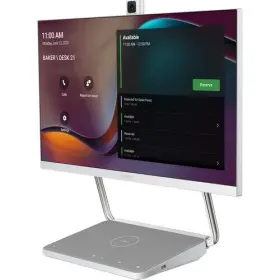
1303161 YEALINK Deskvision Collaboration Display
| Brand | YEALINK |
|---|---|
| Manufacturer Part Number | 1303161 |
| Type | VOIP BUSINESS PHONES/IP PBX |
| Color | GRAY |
| Features | BLUETOOTH |
| Power Over Ethernet | POE, SPEAKERPHONE |
| Interface | ETHERNET, USB, USB-C |
| UPC | 418851103748 |
Review YEALINK Deskvision A24 Collaboration Display
The Yealink DESKVISION A24 Collaboration Display is an all-in-one video conferencing and productivity solution designed for modern workspaces. This innovative device combines crystal-clear video conferencing, a 24-inch IPS touchscreen display, and seamless integration with popular UC platforms, making it an essential tool for remote work, team collaboration, and virtual meetings.
The A24 Collaboration Display features a 24-inch WXGA (1280 x 800) IPS touchscreen display, which delivers vivid colors, sharp text, and wide viewing angles for an immersive visual experience. The touchscreen interface is intuitive and easy to use, giving users quick access to various features and functions, making it a great alternative to traditional PCs and laptops for simple tasks and applications.
At its core, the A24 Collaboration Display is a high-quality video conferencing system. It comes with a full HD (1080p) camera with a wide 90-degree field of view, ensuring every detail is captured during virtual meetings. The speakerphone offers a 2W stereo bottom-firing speaker and a 3-microphone array, providing crystal-clear audio, which enhances the overall video conferencing experience.
Seamless integration with popular Unified Communication (UC) platforms, such as Zoom, Microsoft Teams, and Google Meet, makes it a versatile product for both small and large businesses. With these integrations, the A24 Collaboration Display enables users to easily join virtual meetings directly from their desktop, without requiring the need for a separate UC client or a computer.
For collaboration, the A24 comes with Receptionist and Whiteboard features, which let users easily manage scheduled meetings and join ongoing meetings with one-touch. It also supports vivid annotation and drawing tools for brainstorming sessions, enhancing collaboration and idea sharing within teams.
The A24 Collaboration Display is an energy-efficient and eco-friendly device. It is equipped with a power-saving mode and intelligent power management capabilities, which can help reduce electricity consumption and lower electricity bills. It is also compliant with RoHS (Restriction of Hazardous Substances), WEEE (Waste Electrical and Electronic Equipment), and other related regulations, making it a sustainable choice for workspaces.
With its sleek, contemporary design, the A24 Collaboration Display is a stylish addition to any modern workspace. The device comes with 16 adjustable angles, including portrait and landscape orientations, enabling users to customize the setup according to their preferences for a comfortable, ergonomic experience.
In conclusion, the Yealink DESKVISION A24 Collaboration Display is an all-in-one video conferencing and productivity solution that empowers remote work and team collaboration. Its crystal-clear video conferencing capabilities, 24-inch IPS touchscreen, seamless integrate with popular UC platforms, and eco-friendly design make it a valuable investment for both small and large businesses looking to optimize productivity and improve workflows within their organizations.
The Yealink DMA24 Deskvision A24 Collaboration Display is a versatile all-in-one solution for video conferencing, voice calls, and application sharing. While it offers several advantages, it's essential to consider potential drawbacks before making a purchasing decision. Here are the key pros and cons of the Yealink DMA24 Deskvision A24 Collaboration Display:
Pros:1. Comprehensive Functionality: The DMA24 supports various video conferencing platforms, including Zoom, Microsoft Teams, Google Meet, and Webex. Its versatility makes it a great choice for businesses and individuals looking for an all-in-one solution for communication needs.
2. High-definition Video and Audio: The 23.8-inch full HD display offers excellent video quality, ensuring clear and sharp images during video conferences. Additionally, the speakerphone and microphone array provide excellent audio performance.
3. Wireless Connectivity: With built-in Wi-Fi and Bluetooth connectivity, users can easily join video conferences without the need for cables. This feature adds to the device's convenience and flexibility.
4. Touchscreen Interface: The DMA24 comes with a responsive and intuitive touchscreen interface that makes navigation easy and user-friendly. Users can control various features using simple swipes, taps, and pinches.
5. Versatility and Flexibility: The device supports multiple mounting options, including a stand, wall-mount, or VESA mount. This flexibility allows users to customize the device to fit their workspace and personal preferences.
Cons:1. Software Updates: Users may experience occasional software updates, which could potentially disrupt business operations. While updates often include new features and improvements, they can result in temporary disruptions to video conferencing capabilities.
2. Potential Compatibility Issues: Although the DMA24 supports various video conferencing platforms, some users have reported occasional compatibility issues with certain configurations or software versions. In such cases, Yealink's customer support team is available to assist.
3. Cost: The DMA24's advanced features and high-definition display comes at a premium price point compared to other collaboration displays in the market. This may be a significant consideration for businesses and individuals with budget constraints.
In conclusion, the Yealink DMA24 Deskvision A24 Collaboration Display offers several advantageous features, including comprehensive functionality, high-definition video and audio, wireless connectivity, touchscreen interface, and versatility. However, potential drawbacks include the need for occasional software updates, potential compatibility issues, and cost.
Depending on your business requirements and communication needs, the Yealink DMA24 Deskvision A24 Collaboration Display could be an excellent investment for enhanced productivity and streamlined collaboration. If budget is a concern, it may be worth considering other collaboration displays with more basic capabilities or exploring software options for your existing hardware. Ultimately, it's essential to evaluate your communication requirements and the specific advantages and disadvantages of the DMA24 to make an informed purchasing decision.
Details:
Power consumption. Yealink deskvision a24specs. Display size. 32 to 104 f/ 40 c.
22 to 158 f/ -30 70 c. Storage temperature. Display resolution. Viewing angle.
specifications voipbusiphone:
- brand: Yealink
- mpn: 1303161
- type: Voip Business Phones/ip Pbx
- color: Gray
- features: Bluetooth
- power over ethernet: Poe, Speakerphone
- interface: Ethernet, Usb, Usb-c
- upc: 418851103748
seller voipbusiphone:
- # reviews: 1091
- rating: 100.0%
- city: grovetown, georgia
general voipbusiphone:
- category: Computers > Computers/tablets > Enterprise Networking, Servers > Voip Business Phones/ip Pbx
returns voipbusiphone:
- policy: returns accepted
- method: money back
- paid by: seller
- time: 30 days
payments voipbusiphone:
- other
- wallet: apple-pay
- credit card: visa
offer voipbusiphone:
- in stock #: 1
- sold #: 24
- started: december 9, 2024
- options: ship-to-home
- availability: in stock
- price: $2267.23
- item condition: Neu
shipping voipbusiphone:
- class: standard
- type: calculated
- carrier: fedex, usps
- transit: 3-8 days
- service: fedex ground or fedex home delivery, usps ground advantage
Similar Items:
- Yealink T41p Verizon Sip-t41p Ultra Elegant Ip Phone Corded Display Poe Ac Adapter The 6-LINE ip phone has been designed by pursuing ease of use in even the tiniest details. The SIP-T41P is a feature-rich. Comes with power supply. Delivering a superb sound quality as well rich visual experience. I would rate to be a 8 /9 lightly used 4 month Sharp with some light use marks...(January 16th, 2024)
- Yealink Sip-t54w Ip Phone 4.3-inch Color Display With Bluetooth And Wifi A Only noticeable flaws are some minor staining on the aster ix button and scratching screen. Comes with ethernet cable and power supply, phone has been tested factory reset. Used, but overall in great condition...(January 21st, 2024)
- Yealink Sipt33g T33g Ip Phone 4 Voip Accounts 2.4-inch Color Display Poe Network Lan P It features 4 voip accounts, allowing multiple lines to be managed at once. Condition: - overall in good condition with normal wear. If it isn't pictured then included. With power over ethernet poe capabilities, this phone can be easily connected to a network LAN for seamless communication. Buyer ...(January 24th, 2024)
- Yealink T49g Verizon Video Collaboration Phone Black The phone is in great working condition and has been gently used. It features bluetooth connectivity and a speakerphone that allows for hands-free communication. With its sleek black design and advanced features, it is an excellent choice for businesses that want to improve their communication ...(February 14th, 2024)
- Yealink Sip-t26p Advanced Ip Phone Voip Display Poe Hd Voice Equipped with power over ethernet poe, it ensures uninterrupted power supply. This advanced Yealink SIP-T26P ip phone is a reliable communication tool for businesses. Its corded feature guarantees a stable connection, and its compatibility with various networks makes it versatile device for any ...(February 26th, 2024)
- Yealink 703-000-007 Mshare Usb Screen Content Sharing Adapter Hdmi And Mini Display Port These items may have some damage, missing parts or pieces and make the item non-functional. Items are 100% guaranteed to be received as described...(March 27th, 2024)
- Yealink 1203649 Wireless Presentation And Collaboration System Kit Multi-party collaboration, creativity simulating. Perfectly compatible with windows, mac, IOS, android and other operating systems, it allows you to cast screens tirelessly miscast, airplay, google cast Yealink wireless presentation pod, provides the interactive collaboration feature, making ...(December 23rd, 2024)
- Yealink Vcs-tvmount2 Mounting Adapter For Tv Flat Panel Display Video Conferencing Camera Batteries required. Product dimensions. 32.4 x 4.4 7.7 inches. Compatibility: Yealink video conferencing cameras: UVC40 A20 A30. Mounting adapter. Manufacturer Yealink network technology co. Included components. Information not available. Information not available. Information not available.: this ...(December 27th, 2024)
- Yealink A40-010 1206675 Leading Platform Collaboration Bar For Small To Medium Manufacturer Yealink network technology co. Moreover, Yealink meeting bar A40 features a direct connection to CTP25, enabling simplified login process.this streamlined experience saves time and improves convenience for users. Opened items must be in re-sellable condition including original packaging...(January 4th, 2025)
- Yealink Sip-t2ip T21p E2 Ip Phone 2 Lines 2.3 Inch Graphical Display Dual-port New in open box; Yealink T21P e2 ip phone, 2 lines. 2.3-INCH graphical display. Dual-port 10/100 ethernet, 802.3AF poe, power adapter included SIP-T21P E2...(January 20th, 2025)
- Yealink 841885110497 Modular Compute Solution For Interactive Whiteboards Collaboration This item is brand-new, factory sealed. Opened items must be in re-sellable condition including original packaging and all accessories. Ltd, manufacturer part NUMBER1303085, product model More-ops, title, title Yealink modular compute solution for interactive whiteboards collaboration creepiest, ...(January 28th, 2025)
