- New/Used VoIP Business Phones Offers
- sku: 1520492300847533
- YEALINK VCS-TVMOUNT2
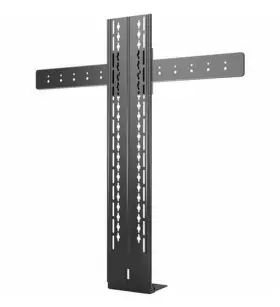
VCS-TVMOUNT2 YEALINK Mounting Adapter Tv Flat Panel Display
| Brand | YEALINK |
|---|---|
| Manufacturer Part Number | VCS-TVMOUNT2 |
| Type | MOUNTING ADAPTER |
| UPC | 841885107695 |
Review YEALINK Mounting Adapter For Tv Flat Panel Display Video Conferencing Camera
The Yealink VCS-TVMount2 is a versatile and easy-to-use mounting adapter designed specifically for integrating Yealink video conferencing cameras with flat-panel TVs, offering a simple and effective solution for enhancements in video conferencing experiences.
This mounting adapter, with its slim and sleek design, seamlessly blends into your video conferencing setup while providing optimal camera positioning for the best possible video quality. The adapter's adjustable arms facilitate effortless tilting and panning motions, ensuring you maintain an ideal field of view during video conferencing sessions, irrespective of the TV size or shape.
Key features of the Yealink VCS-TVMount2 include compatibility with a selection of Yealink's video conferencing cameras, ranging from the T5 series to the VC-180, allowing users to utilize their preferred camera for video conferencing. Cable management is made convenient through the built-in cable tidy column, ensuring a clean and organized setup that minimizes clutter and potential tripping hazards.
Installation of the adapter is a straightforward process, requiring no professional assistance. Simply connect the adapter to your Yealink camera and mount it onto your flat-panel TV using the provided screws and washers. With its universal compatibility and plug-and-play installation, the Yealink VCS-TVMount2 is an invaluable addition for those seeking a high-quality video conferencing experience at home or in the office.
The Yealink VCS-TVMount2 is more than just an adapter - it's a must-have assistant for video conferencing enthusiasts. By providing a stable mount for your camera and effortless adjustability, you can present yourself confidently during virtual meetings and calls, maximizing productivity and effectiveness in your communication efforts.
Pros and Cons of Buying Yealink VCS-TVMount2 Mounting Adapter for Flat Panel Displays in Video Conferencing
The Yealink VCS-TVMount2 is a mounting adapter designed specifically for integrating a Yealink video conferencing camera with a flat-panel display during video conferencing sessions. In this analysis, we will explore the prominent pros and cons of investing in this mounting adapter.
Pros:1. Seamless Integration: The VCS-TVMount2 allows you to mount the video conferencing camera directly onto the back of a flat-panel display, thereby creating a visually unified setup with no additional wires or cables cluttering up the workspace. This results in a professional and streamlined appearance.
2. Ergonomically-designed: This mounting adapter has adjustable functionalities that cater to the needs of the user. Its pan, tilt, and zoom features enable the user to adjust the camera angle for optimal positioning and view. Furthermore, its auto-focus functionality ensures that the camera maintains a clear image of the participants.
3. Flexible Installation: The VCS-TVMount2 is compatible with various Yealink video conferencing cameras and flat-panel displays. It can also be installed on both the front and rear sides of the display, providing more installation options.
4. Improved Collaboration and Productivity: The mounting adapter's seamless integration and smooth functionality contribute to a more efficient and productive video conferencing experience. Enhanced collaboration is also facilitated since all participants can easily see each other during the session.
Cons:1. Initial Cost: The cost of the Yealink VCS-TVMount2 may represent an extra expense for organizations or individuals who are investing in video conferencing technology. The price could be considered a barrier for smaller businesses or home users.
2. Requires a Flat-Panel Display and Compatible Camera: To use the mounting adapter, you must already have a flat-panel display and a compatible Yealink video conferencing camera. If you require an adapter for a different type of display, you may need to consider a different solution.
3. Additional Complexity: The presence of another component, such as the mounting adapter, could add an additional layer of complexity to the video conferencing setup. Users might need additional time and effort to ensure proper installation and functioning of the adapter.
Conclusion:The Yealink VCS-TVMount2 mounting adapter offers a range of benefits for video conferencing setups, such as seamless integration, improved image quality, and flexible installation options. However, its cost, compatibility requirements, and additional complexity may deter some potential buyers. In the end, the decision to invest in this mounting adapter depends on your specific needs and budget. If the benefits outweigh the cons and contribute to a more productive and professional video conferencing experience for your organization or personal use, it would be a valuable investment.
Recommendation:If investing in the Yealink VCS-TVMount2 aligns with your needs and budget, it could significantly improve your video conferencing experience by providing a clean and streamlined setup and enhance collaboration through optimized camera positioning. Consider evaluating the specific requirements of your video conferencing setup, and carefully review the compatibility of the mounting adapter with your flat-panel display and Yealink camera before making a final decision.
Details:
Batteries required ?. Product dimensions. 32.4 x 4.4 7.7 inches. Compatibility: Yealink video conferencing cameras: uvc40 a20 a30. Mounting adapter.
Manufacturer Yealink network technology co. Included components. Information not available. Information not available.
This item is brand-new, factory sealed. Yealink VCSTVMOUNT2 mounting adapter, information not available mounting adapter offers a dependable mounting solution with maximum productivity. Part number. VCSTVMOUNT2. Opened items must be in re-sellable condition including original packaging and all accessories.
Yealink mounting adapter for tv, flat panel display, video conferencing camera. Durable feature for maximum efficiency and convenience. Batteries included?. Information not available.
specifications voipbusiphone:
- brand: Yealink
- mpn: Vcs-tvmount2
- type: Mounting Adapter
- upc: 841885107695
returns voipbusiphone:
- paid by: seller
- policy: returns accepted
- time: 30 days
- method: money back
offer voipbusiphone:
- prices: $201.00–$221.62
- item condition:
- New
- Neu
- Brand New
- in stock #: 5
- availability: in stock
- started: december 27, 2024
- options: ship-to-home
- sold #: 28
general voipbusiphone:
- category: Computers > Computers/tablets > Enterprise Networking, Servers > Voip Business Phones/ip Pbx
payments voipbusiphone:
- credit card: mastercard
- other
- wallet: google-pay
shipping voipbusiphone:
- carrier: fedex
- transit: 4-4 days
- class: standard
- service: fedex ground or fedex home delivery
- type: fixed
seller voipbusiphone:
- # reviews: 319921
- city: USA
- rating: 98.9%
Similar Items:
- Yealink T41p Verizon Sip-t41p Ultra Elegant Ip Phone Corded Display Poe Ac Adapter The 6-LINE IP phone has been designed by pursuing ease of use in even the tiniest details. The SIP-T41P is a feature-rich. Comes with power supply. Delivering a superb sound quality as well rich visual experience. I would rate to be a 8 /9 lightly used 4 month Sharp with some light use marks...(January 16th, 2024)
- Yealink Sip-t54w Ip Phone 4.3-inch Color Display With Bluetooth And Wifi A Only noticeable flaws are some minor staining on the aster ix button and scratching screen. Comes with Ethernet cable and power supply, phone has been tested factory reset. Used, but overall in great condition...(January 21st, 2024)
- Yealink T58v With Camera And Power Supply Used A - 36, 1 Yealink T58V. Please look at pictures closely - item sold as is. 1 - handset cord. Lot includes. Note: phone still have the plastic cover in screen. 1 - desk stand...(January 23rd, 2024)
- Yealink Mvc840-c2-211 Teams System For Extra-large Room Video Conferencing Kit Multi-pack products usually come with one manual and set of drivers per box, not item. Shipping charge is estimated and may change due to weight, dimensions, delivery location carrier. New pulls/oem products are new, usually purchased in bulk by us. It is purchased by us in bulk and may have minor ...(January 23rd, 2024)
- Yealink Sipt33g T33g Ip Phone 4 Voip Accounts 2.4-inch Color Display Poe Network Lan P It features 4 VoIP accounts, allowing multiple lines to be managed at once. Condition: - overall in good condition with normal wear. If it isn't pictured then included. With power over Ethernet Poe capabilities, this phone can be easily connected to a network LAN for seamless communication. Buyer ...(January 24th, 2024)
- Yealink Dd10k Dect Usb Dongle For T41s T42s Pairing With W60b W70b W52b It pairs seamlessly with Yealink W60B, W70B, and W52B base stations, giving you the freedom to move around while on a call. Its perfect for those in need of a VoIP business phone or IP PBX, and it offers range features, including supporting Yealink SIP-T41S/T42S with Fe 66.82.0. This Yealink DD10K ...(January 24th, 2024)
- Yealink T67lte Office Phone For Verizon T76lte The phone comes in a set of two, making it great value for businesses need multiple lines. The phone is also compatible with Verizon's T76LTE network, ensuring a strong and dependable connection. With Bluetooth capabilities and a built-in speakerphone, it offers convenient hands-free communication ...(January 25th, 2024)
- Yealink Mp56-teams Mp56 Ms Teams Edition Ip Phone With Ac-adapter j1643 Phone w/ac-adapter #J1643. Yealink MP56 ms teams edition IP. Our determination is made by item size, weight and your zip code...(January 25th, 2024)
- Yealink Vcm34 Video Conferencing Microphone Array Item condition labeled as used because of minor handling marks on device. Yealink VCM34 video conferencing microphone array. Otherwise item is like new...(January 25th, 2024)
- Yealink W59r Ruggedized Dect Wireless Handset With Power Adapter The listed prices do not apply. Item condition. Power adapter included. This unit is: used. Yealink W59R ruggedest sect wireless handset w/ power adapter. Item is pulled out from working environment. What is included...(January 28th, 2024)
- Yealink Vp59 Flagship Smart Video Phone Microsoft Teams Edition Free Shipping Yealink VP59 Microsoft teams edition...(January 29th, 2024)
