- New/Used VoIP Business Phones Offers
- sku: 2142952677172603
- POLYCOM 8200-84190-001
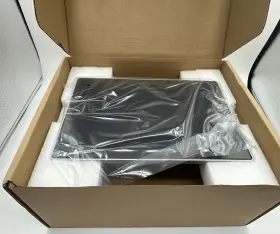
8200-84190-001 POLYCOM Poly Presence Touch Control Panel
| Brand | POLYCOM |
|---|---|
| Type | TOUCH PANEL |
| Features | POWER OVER ETHERNET |
| Interface | ETHERNET |
| UPC | 820084190001 |
Review POLYCOM Poly Real Presence Touch Control Panel Screen New Open
The Polycom 8200-84190-001 Poly Presence Touch Control Panel Screen 10 is an essential component of the Polycom VVX-8000 Series Business Media Phones, designed to enhance the user experience and optimize communication capabilities. This high-resolution, 10-inch capacitive touchscreen panel is designed to provide an intuitive and user-friendly interface for managing various features and functionalities of the VVX-8000 phone.
The screen features a resolution of 1280 x 800 pixels, delivering crisp and clear visuals for making video calls, viewing multimedia content, and navigating through menus. The touchscreen is responsive and sensitive, allowing users to easily swipe, tap, and pinch to zoom for an optimal viewing experience.
The Poly Presence Touch Control Panel Screen 10 also serves as a status display, providing users with real-time information on their communication status, including availability, call waiting, and voicemail messages. The screen's backlight can be adjusted to suit different lighting conditions, ensuring optimal readability at all times.
Additionally, the touchscreen panel supports a wide range of applications and features, including Polycom's Open SIP and SIP-TAPI APIs, which enable developers to create custom applications for the phone. Other features include support for multiple languages, a built-in speakerphone, and integration with calendars, email, and contacts.
The screen is designed with a sleek and modern look, featuring a slim bezel and a scratch-resistant surface to protect against everyday wear and tear. It is also easy to install, requiring only a few simple steps to connect and configure with the VVX-8000 phone. Overall, the Polycom 8200-84190-001 Poly Presence Touch Control Panel Screen 10 is a valuable addition to any Polycom VVX-8000 Series Business Media Phone, offering enhanced functionality, improved user experience, and increased productivity for businesses and individuals alike.
The Polycom 8200-84190-001 Poly Presence Touch Control Panel is a device designed to enhance the user experience in video conferencing systems. This touch screen control panel offers several features that can be beneficial for users, but it also comes with some potential drawbacks.
Pros:1. Enhanced User Experience: The touch screen control panel provides a more intuitive and convenient way to manage video conferencing settings, including video and audio quality, camera control, and call management.
2. Customizable: The control panel can be customized to meet the specific needs of the user or organization, allowing for easy access to frequently used features.
3. Improved Productivity: The control panel can save time by allowing users to quickly adjust settings without having to use the keyboard or mouse.
4. Better Collaboration: The control panel can facilitate better collaboration by providing easy access to features such as annotation, screen sharing, and instant messaging.
Cons:1. Cost: The Polycom 8200-84190-001 Poly Presence Touch Control Panel can be expensive, and the cost may not be justifiable for smaller organizations or individual users.
2. Compatibility: The control panel may not be compatible with all video conferencing systems, and users should check compatibility before making a purchase.
3. Complexity: The control panel may have a learning curve, and users may need to spend time familiarizing themselves with the various features and settings.
In conclusion, the Polycom 8200-84190-001 Poly Presence Touch Control Panel can offer significant benefits for organizations and individuals who rely on video conferencing for communication and collaboration. However, the cost and potential complexity may make it a less attractive option for some users. Ultimately, the decision to purchase this device should be based on the specific needs and budget of the organization or individual.
Recommendation: If your organization or business relies heavily on video conferencing and you have the budget for it, the Polycom 8200-84190-001 Poly Presence Touch Control Panel is a worthwhile investment. It can save time, improve collaboration, and enhance the user experience. However, if you have limited resources or only occasional use for video conferencing, you may want to consider other, more cost-effective options.
Details:
Sleek design with integrated power over ethernet adds to any meeting space. The simple and intuitive design let's you focus on your conversations instead of the technology. Polycom real presence touch 8200-84190-001: the is required along with the Skype for business license to use a system in mode. Please reach out with any questions or concerns.
Position it the way that you want, either standing taller or flipped over for a lower profile. The design is consistent across the Polycom portfolio, whether you re calling from a conference room or using desktop, mobile web client. Easy access to share content, adjust camera views, change participant layouts and more get the most out of your meeting. Polycom real presence touch is a touch interface for group series and Polycom immersive teleprocessing solutions.
No ethernet cable provided. Background image can be customized to match your branding or provide information about the room. Speed dials provide quick access to people, rooms, or virtual meeting rooms. Please see pictures.
The home screen buttons and default screens can be selected by administrators to optimize the experience for their user base, resulting in fewer support calls. Combined and economy shipping available on most items. This makes it easy to use video collaboration from any environment, with an interface that is instantly familiar no matter where you re calling. Includes ethernet cable for connection to the system.
Search a directory to quickly connect the right person or location. Polycom poly real presence touch control panel screen 10 8200-84190-001 new open, real presence 8200-84190-001 is a touch interface for group series and Polycom immersive teleprocessing solutions. One touch dialing from the integrated calendar, right on home screen.
specifications voipbusiphone:
- brand: Polycom
- type: Touch Panel
- features: Power Over Ethernet
- interface: Ethernet
- upc: 820084190001
offer voipbusiphone:
- started: april 26, 2025
- in stock #: 5
- prices: $20.00–$1325.00
- item condition:
- Used
- New
- Seller refurbished
- availability: in stock
- options: ship-to-home
- best offers: true
- sold #: 26
payments voipbusiphone:
- wallet: paypal
- credit card: visa
- other
seller voipbusiphone:
- # reviews: 938
- rating: 100.0%
- city: wyoming, rhode island
general voipbusiphone:
- category: Computers > Computers/tablets > Enterprise Networking, Servers > Voip Business Phones/ip Pbx
shipping voipbusiphone:
- transit: 4-10 days
- type: calculated
- service: usps ground advantage, usps priority mail
- carrier: usps
- class: standard, expedited
returns voipbusiphone:
- time: 30 days
- method: money back
- policy: returns accepted
- paid by: buyer
Similar Items:
- Polycom 2201-48820-001 Poly Vvx 250 Business Ip Phone Poe Pn New handset cord. Quoted shipping is to lower 48 states. It is the ideal phone for knowledge and cubicle workers who require advanced features. NP: 2201-48820-001. We buy all brands of telephone systems and phone...(January 18th, 2024)
- Polycom 2201-46350-025 New Vvx Color Expansion Module Excellent condition. Comes as pictured...(January 19th, 2024)
- Polycom 2200-49720-019 Poly Ccx 500 Business Media Phone For Microsoft Teams Poe Part #: Polycom 2200-49720-019 for sale...(January 26th, 2024)
- Polycom 2201-4972-001 Poly Ccx 500 Phone For Microsoft Teams Poe 2200-49720-001 Grade-a As the phone is Poe capable, an ac adapter not included. Includes phone base, stand, and handset with cord. S:// .poly /US/EN/PRODUCTS/PHONES/CCX/CCX-5 poly cc 500 IP phone with teams. Microsoft teams required. Units have been reset to factory defaults. P/n 2200-49720-001...(January 30th, 2024)
- Polycom 2200-49750-001 Poly Ccx 700 Opensip Voip Phone These products may have minor cosmetic blemishes due to normal usage. Every effort has been made to ensure the accuracy of all information contained in this ad. New pulls/oem products are new, usually purchased in bulk by us. Products may or not come with manual, batteries back up disks, unless ...(January 31st, 2024)
- Poly 2200-87010-025 Polycom Voip Edge E350 Ip Phone 2200-87010-025 New open box, damaged this Polycom VoIP phone is a top-of-the-line communication device designed for business use. Its sleek design and user-friendly interface make it easy to use, its advanced technology ensures that your calls will always be clear uninterrupted. This IP phone is perfect for ...(March 25th, 2024)
- Polycom Audio 8f3h5aa-aba Poly Ata 402 2fxs Voice Port Voip Adapter With Open Sip And Power Supply Extend analog phone capability. Management via PMS-Sp APOS. API support enables real-time Alta status monitoring. A pc port provides a bridge to other network devices. The poly Alta is zoom certified and Microsoft supported through teams sip gateway. As regions worldwide shift to digital networks, ...(March 30th, 2024)
- Polycom 2200-87815-025 Poly Edge E300 Ip Desk Phone It is purchased by us in bulk and may have minor scratches blemishes. This equipment was disassembled from whole new units for reselling. Used pulls products are pulled from a whole used unit for reselling. Warranty period may differ. Users manual may differ: users be abridged or not included. ...(April 15th, 2024)
- Polycom 2201-49700-001 Poly Ip Desktop Phone Ccx 400 5 Inch Color Touchscreen Poe Voip Sip It was removed from an office setting with light use. It has been tested on Poe and reset to factory defaults. S://net storage .ring central /data sheets/phones/polycom/cc 400.PDF item is used, but like new. Comes with phone, handset and cord, no power supply...(April 18th, 2024)
- Polycom 2201-86240-001 Poly Trio C60 Smart Ip Conference Phone R2 ready for resale/tested key functions. Data bearing: factory reset...(April 19th, 2024)
- Polycom 220049800001 Poly Edge B10 Ip Desk Phone With Power Adapter Open Sip Connect With eight phone lines, this corded telephone boasts a sleek black design and is ideal for enterprise networking server use. This Polycom edge B10 IP desk phone with power adapter is the perfect addition to any business communication setup. It comes with a power adapter and is sold in like new ...(May 19th, 2024)
